

How to Download Douyin Videos on iPhone
A browser-based Douyin workflow for iPhone, including the exact place Safari saves the file and what to do when it opens in a tab instead.
Short answer
Copy the public Douyin share link, paste it into SnapVideoTools, and save one of the formats returned by the source. Safari normally puts an internet download in the Downloads folder inside the Files app; it does not automatically add the file to Photos.
Download a public Douyin item in Safari
- 1
Open the public Douyin item, tap Share, and choose Copy link.
- 2
Open the Douyin downloader in Safari and paste the copied share text or URL.
- 3
Choose Find Download Options and wait for the available video, image, audio, or cover results.
- 4
Tap the result you need and confirm the Safari download when prompted.
Where the file is saved on iPhone
Open Files, choose Browse, and check Downloads under iCloud Drive or On My iPhone. Safari's download button beside the address field also shows recent downloads.
A browser download stays in Files unless you open the file, use Share, and choose Save Video or Save Image when iOS offers that action.
Douyin short links and full links
SnapVideoTools recognizes public links on douyin.com, iesdouyin.com, and v.douyin.com. A short v.douyin.com link must redirect before the item can be read, while a full item URL is easier to test when something fails.
What can prevent the download
- The item is private, deleted, login-only, age-restricted, or unavailable in the current region.
- The short link has expired or redirects to a live room rather than a normal item.
- Douyin exposes only some media variants; quality, audio, cover, and watermark status therefore vary by item.
- The returned temporary media URL expired before Safari saved it; parse the original item again.
Public-link workflow verification
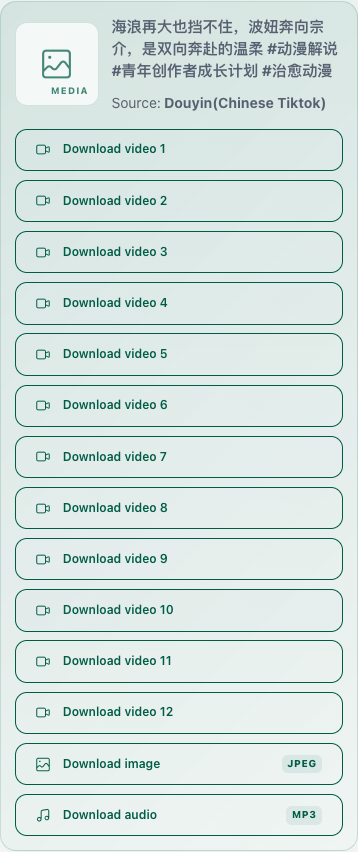
On August 23, 2026, we submitted one public full Douyin item URL to SnapVideoTools. This is a reproducible parser check, not a claim that every Douyin post returns the same files.
- Test workstation: Mac; macOS 26.5.2; Google Chrome 151.0.7922.170; 390 × 844 browser viewport.
- Tested link type: a public full douyin.com/video URL.
- Observed result: twelve video options, one image option, and one separate audio option. A format badge is shown only when the media URL itself confirms the file extension.
- Not covered by this check: a Douyin short link and the final save action on an iPhone.
- Scope: link parsing and result display only. The Files > Downloads guidance comes from Apple Support; this review did not use a physical iPhone.
References
Frequently asked questions
Related content
How to Download a Douyin Video Without a Watermark When Available
Learn when a public Douyin item may provide a clean video result, how to check the returned files, and why watermark status cannot be guaranteed.
GuideDouyin Short Link vs Full Link
Compare v.douyin.com short links with full douyin.com item URLs and fix redirects, expired shares, live links, or access restrictions.
GuideWhy a Downloaded Douyin Video Has No Sound
Diagnose a silent Douyin download by checking the original post, separate audio results, the selected media stream, player compatibility, and source access.
Help